
YouCine APK for PC: Complete Download and Setup Guide
|
YouCine |
|
|
V1.7.6 |
|
|
43MB |
|
|
Windows 10+ |
|
|
Movies & TV Shows |
|
|
10M+ |
Watch Free HD Movies & TV Shows on Windows & Mac
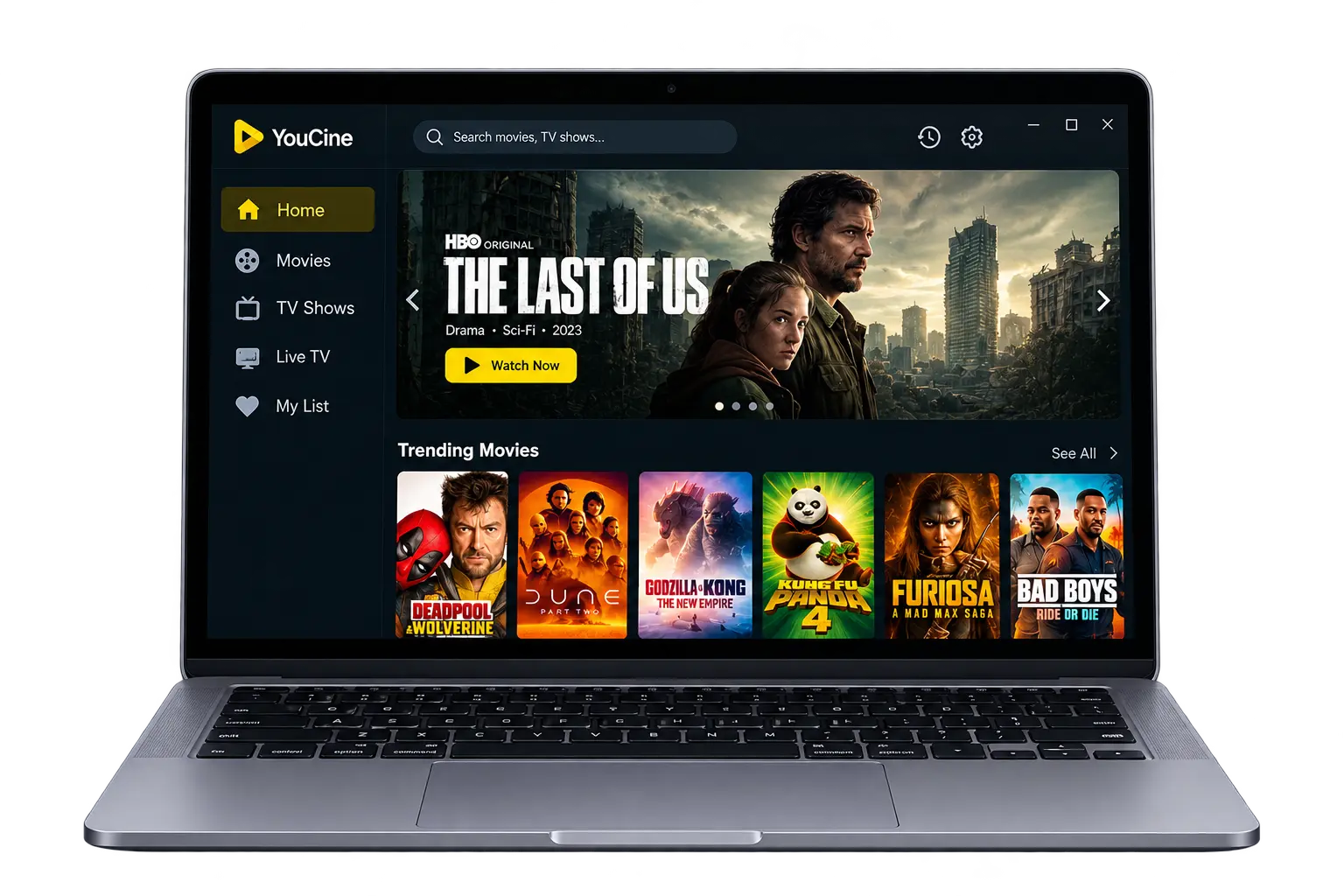
Watching a movie on a small phone screen gets old fast. Your neck hurts, the battery drains, and the subtitles are tiny. Sooner or later you wonder if you can run the same app on your computer. That is exactly what people search for when they type Youcine APK for PC. The short answer is yes, but not the way most people expect.
There is no simple installer you double-click, and a few websites that claim otherwise are best avoided. In this guide you will learn how Youcine works on Windows through an Android emulator, which emulator to pick, the exact install steps, the system requirements, a safety checklist and fixes for the most common errors. If you only need the phone version, start with our Youcine APK for Android guide.
There is no official Youcine app for Windows. To run it on a PC, install an Android emulator (BlueStacks or LDPlayer) from its official site, then drag the APK into it. You need Windows 10/11, 4 GB RAM (8 GB recommended) and 5 GB free space. Scan the APK on VirusTotal first, and never run a “Youcine Setup.exe” file.
YouCine APK for PC Download Details
The essential details before you set anything up on your computer.
|
App |
Youcine APK (Android app) |
|
Version |
v1.17.6 |
|
How it runs on PC |
Through an Android emulator |
|
Supported Windows |
Windows 10 and Windows 11 |
|
Minimum RAM |
4 GB (8 GB recommended) |
|
Free disk space |
At least 5 GB for the emulator, plus room for the app |
|
Native Windows version |
None known |
|
Price |
Free (emulator and APK) |
Scan every APK before you open it. If you want the full checklist, jump to the safety section below.
Is There an Official YouCine APP for PC
What actually exists for Windows, and what to treat as a warning sign.
As far as I can tell, Youcine is built for Android only. I could not find a verified Windows installer from a trusted developer, so the practical way to use it on a computer is an Android emulator.
Why You Need an Emulator for YouCine APK for PC
An APK is an Android file. Windows cannot open it directly, just like it cannot open an iPhone app. An emulator creates a virtual Android phone on your desktop, and that virtual phone runs Youcine the same way a real one would.
Why You Should Avoid Youcine PC Setup.exe Files
Some pages offer an .exe file labeled Youcine for PC. That is a different file, and nobody can tell you what it contains. Executable files can install malware with much deeper access to your computer than an APK inside an emulator. Skip them.
Ways to Run Youcine on a Computer
A quick comparison of the options, from the easiest to the least practical.
Android Emulator (Recommended)
This is the simplest and most reliable method. You install the emulator, add the APK, and open the app inside the emulator window. Most guides, including this one, are based on this route.
Windows Subsystem for Android (No Longer Supported)
Older guides tell you to use Windows Subsystem for Android on Windows 11. Microsoft ended support for it in March 2025, so I would not build a setup around it. Stick with an emulator instead.
Screen Mirroring From Your Phone
If Youcine is already installed on your phone, you can mirror the phone screen to your PC with a tool such as scrcpy. The app still runs on the phone, so your battery and data are used. It works, but an emulator feels more natural.
Best Android Emulators for YouCine on PC
Which emulator suits which kind of computer and user.
| Emulator | Best for | Things to know |
|---|---|---|
| BlueStacks | Beginners and general use | Popular and well documented, but it can be heavy on RAM |
| LDPlayer | Mid-range and older PCs | Generally lighter, Windows only |
| Other emulators (Nox, MEmu) | Experienced users | Download only from the official site and watch for bundled extras |
My pick for most people is BlueStacks, mainly because the instructions are easy to follow. If your computer is older, try LDPlayer first. Whichever you choose, download it from the official website and nowhere else.
YouCine APK for PC System Requirements
Check your computer against these numbers before you install the emulator.
| Operating system | Windows 10 or Windows 11 for current BlueStacks 5 releases |
| Processor | Intel or AMD processor |
| RAM | 4 GB minimum, 8 GB or more recommended |
| Storage | 5 GB free minimum, SSD recommended |
| Account | Administrator access on your PC |
| Drivers | Up-to-date graphics drivers |
| Virtualization | Enabled in BIOS or UEFI for smoother performance |
| Internet | About 10 Mbps for smooth HD streaming |
These figures come from the emulator maker’s own BlueStacks 5 requirements page, and they can change with new releases. Other emulators list their own numbers, so check before you download.
How to Install YouCine APK for PC With BlueStacks
A step-by-step walkthrough for Windows 10 and 11.
Before You Start
- Close heavy programs so the emulator has enough RAM.
- Update your graphics drivers.
- Turn on virtualization in your BIOS or UEFI if your PC supports it.
- Free up at least 10 GB of storage to be safe.
Step-by-Step Installation
- Download BlueStacks from its official website and run the installer.
- Let the setup finish, then open BlueStacks. The first launch can take a few minutes.
- Sign in with a Google account only if you want to. Use a spare account, not your main one.
- Download the Youcine APK to your PC using the download box above.
- Scan the file on VirusTotal before you open it.
- Drag the APK onto the BlueStacks window, or use the install APK option in the emulator sidebar.
- Wait for the installation to finish. Youcine will appear on the emulator home screen.
- Click the Youcine icon, choose your language and allow only the permissions the app genuinely needs.
[Real screenshot: BlueStacks home screen with Youcine icon — to be added]
Settings That Help Performance
A smooth setup saves you a lot of frustration later, so take two minutes to tune the emulator before you start streaming. Open the emulator settings and look for the Performance section. Giving the emulator two to four CPU cores and two to four GB of RAM is usually enough. If your PC has only 4 GB in total, keep the allocation low so Windows stays responsive.
How to Install YouCine APK for PC With LDPlayer
A lighter alternative if BlueStacks feels slow on your computer.
- Download LDPlayer from its official website and install it.
- Open LDPlayer and wait until the virtual Android home screen loads.
- Download the Youcine APK to your PC and scan it first.
- Drag the APK into the LDPlayer window, or use its APK install button.
- Open Youcine from the home screen once the installation is complete.
Menu names and button positions change between emulator versions, so look for the install APK option if yours differs. If LDPlayer still feels sluggish, lower the resolution in its settings before you blame the app.
[Real screenshot: Youcine running inside the emulator — to be added]
Key Features of YouCine APK for PC
What you gain by watching on a computer instead of a phone.
Bigger Screen Viewing
Movies and anime simply look better on a laptop or desktop monitor. Details are easier to see, subtitles are readable from a comfortable distance, and long watching sessions are far less tiring for your eyes.
Keyboard and Mouse Control
Inside the emulator you can click through menus with a mouse and type searches on a real keyboard. That is faster than tapping a small screen and is a big help when you search for long titles.
Better Sound Through PC Speakers
Laptop speakers, desktop speakers or headphones usually sound better than a phone speaker. Connect a decent headset and dialogue, music and effects become clearer, especially in action films and live sports commentary.
Easy Subtitle Reading
Subtitles are much easier to follow on a larger display. Switching languages from the player menu feels simple with a mouse, which is useful for anime, Korean dramas and other international titles.
Multitasking Made Simple
You can keep the emulator in a window and use other programs beside it. Take notes, chat with friends or browse while a stream plays, which is awkward to do on a phone.
More Room for Downloads
Computers normally have far more free storage than phones. If your build supports offline downloads, you can save more titles without constantly deleting older ones, as long as the emulator has enough disk space.
Stable Wired Internet
You can plug your PC into the router with an Ethernet cable. A wired connection is usually steadier than Wi-Fi, which means fewer buffering pauses during HD streams and live matches.
Full-Screen and Second Monitor Use
The emulator window can be maximized to fill your display or dragged to a second monitor. That gives you a proper home-cinema feel, with the video on one screen and your work on the other.
Quick Access From the Desktop
Many emulators let you pin an app shortcut to the desktop or start menu. After the first setup, opening Youcine takes one click instead of launching the emulator and hunting for the icon.
No Battery Worries
A plugged-in computer does not run out of battery halfway through a film. You also avoid the heat that makes phones slow down during long viewing sessions, so playback stays steadier from start to finish.
YouCine APK Languages and Subtitles on PC
How to switch audio and subtitles while you watch inside the emulator.
Language options work the same as on Android. Start a video, click the settings or subtitle icon in the player, then choose a subtitle language or a dubbed audio track if the source offers one. To see which languages are commonly available, read the Youcine languages section of our main guide. If your language is missing, switch to another source for the same title. Availability depends on the source, not on whether you are using a phone or a PC.
Is YouCine APK for PC Safe?
A short checklist to keep your computer and accounts protected.
- Get the emulator from its official site. Third-party download pages often bundle extra software.
- Scan the APK on VirusTotal. Several flags from well-known engines mean you should delete the file.
- Use a spare Google account. Do not sign in with your main account or reuse a password.
- Keep Windows and your antivirus updated. Some antivirus programs clash with emulators, so check for notices.
- Avoid cracked or “pro” emulators. They are a common way for malware to reach a PC.
For a deeper look at permissions and risks, read the safety section of our Youcine APK guide.
Is It Legal to Watch YouCine APK on PC?
The legal side is the same on a computer as on a phone.
Installing an emulator and an APK is not illegal. The question is the content. Youcine streams from third-party sources, and watching copyrighted material without permission can break the law depending on where you live. I am not a lawyer, so check your local rules.
Fixing Common Youcine PC Problems
Quick solutions for the errors people meet most often on Windows.
APK Will Not Install in the Emulator
The file may be damaged or incomplete. Download it again, check that the size matches, and try the install option in the emulator sidebar instead of drag and drop.
Emulator Is Slow or Laggy
Close other programs, raise the emulator’s CPU and RAM allocation, and make sure virtualization is on. On older machines, a lighter emulator such as LDPlayer may run better.
Black Screen After Opening Youcine
Update your graphics drivers and try switching the graphics mode in the emulator settings. Restarting the emulator also clears many temporary display glitches.
Virtualization Error
Restart your PC and enable virtualization in the BIOS or UEFI. The setting is often called Intel VT-x or AMD-V, and the exact location differs by manufacturer.
Video Buffering or No Sound
Lower the video quality and try another source. For sound issues, check the emulator volume, the Windows output device and the speaker settings inside the emulator.
Emulator Crashes on Startup
Run it as administrator, update the emulator and reinstall if the problem continues. Check your antivirus too, because it can block the emulator.
How to Uninstall YouCine From Your PC
A clean removal of the app and, if you want, the emulator.
- Open the emulator and press and hold or right-click the Youcine icon.
- Choose Uninstall and confirm.
- Delete the APK file from your Downloads folder.
- To remove the emulator as well, open Windows Settings, Apps, and uninstall it there.
YouCine on PC vs Android Phone
A side-by-side comparison to help you pick the better setup.
| Factor | PC with emulator | Android phone |
|---|---|---|
| Screen size | Large | Small |
| Setup | Longer: emulator plus APK | Quick: APK only |
| Performance | Depends on your hardware | Usually smooth on modern phones |
| Portability | Stays at your desk | Goes anywhere |
| Battery | Not an issue when plugged in | Drains during long streams |
| Extra software | Emulator required | None |
YouCine APK for PC FAQs
Short answers to the questions people ask the most.
Is there an official Youcine app for PC?
I could not find a verified one. The practical way to use Youcine on a computer is through an Android emulator.
Can I run Youcine on Windows 11?
Yes, through an emulator such as BlueStacks. Do not rely on Windows Subsystem for Android, because Microsoft has ended support for it.
Can I use Youcine on a Mac?
Some emulators offer macOS versions, but requirements differ, especially on Apple Silicon. Check the emulator’s own requirements before you install anything.
Which emulator is best for Youcine?
BlueStacks is the easiest for beginners, while LDPlayer often runs better on older computers. Both should be downloaded from their official sites.
Do I need a Google account?
The emulator may ask for one, but you can use a spare account. Do not sign in with your main account.
Can Youcine run on a low-end PC?
It can run on a PC with 4 GB of RAM, but 8 GB is much smoother. Lowering the video quality and closing other programs helps.
Why do I get a black screen in the emulator?
Outdated graphics drivers are the most common cause. Update the drivers and restart the emulator.
Final Verdict: Is YouCine on PC Worth It?
My overall take on watching Youcine on a computer.
Watching movies and shows with Youcine APK for PC is a great way to enjoy a bigger screen, better sound and a steadier connection. The price is a slightly longer setup, since you need an emulator and the APK file. Stick to the official emulator websites, scan the APK before you install it, use a spare Google account and never download an .exe that claims to be Youcine for PC. Do that and most of the risk disappears. If you would rather skip the setup, a legal free service in your browser is the easiest option. Otherwise, follow the steps above and enjoy the show.
Need Youcine on an Android device? Go back to the main Youcine APK download page. For a television, see Youcine for Smart TV.
Disclaimer: This article is for information only. We do not host or promote copyrighted content. You are responsible for following the copyright laws of your country.