
Old Versions • 2026 Guide 🔄
Youcine APK Old Version: Download Previous Versions for Android
Guide type
Downgrade & rollback guide
App
YouCine
Works on
Android — phone, TV and TV box
Price
Free
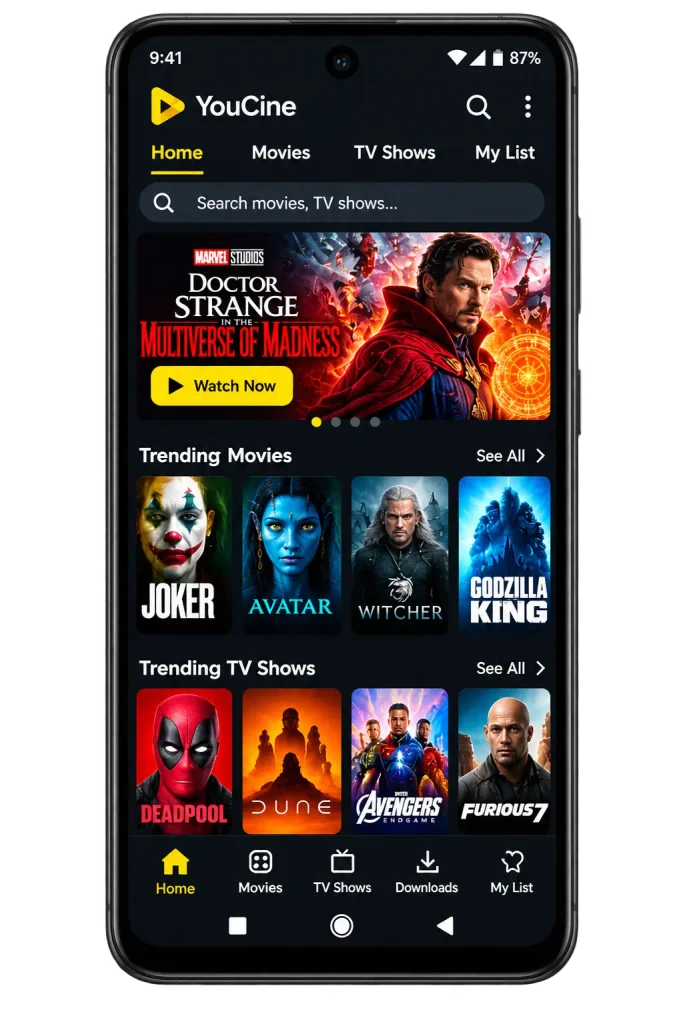
You tapped update, and now the app crashes on launch. Or maybe your old phone refuses to open the newest build, or the menus moved and you cannot find anything. Whatever the reason, you are suddenly wondering whether you can go back to the version that worked. You can, but it is not as simple as clicking a download button.
Android blocks direct downgrades, old files come with their own risks, and plenty of pages labeled Youcine APK old version are not what they claim to be. This guide covers when an older version helps, which version numbers people mention, how to check a file before you trust it, and the exact steps to roll back without wrecking your phone. For the current release, see our main Youcine APK page.
In This Guide
- Quick Answer: Should You Install an Old Version of Youcine?
- Why People Look for Older Youcine Versions
- Youcine Version Overview
- Is It Safe to Install an Old Version?
- Before You Downgrade: Prepare Your Device
- How to Install an Old Version of Youcine (Step by Step)
- Old Version vs Latest Version
- Features and Benefits of Using an Older Youcine Version
- Youcine Old Version for Android TV and TV Boxes
- Can You Update Back to the Latest Version Later?
- Common Problems With Old Versions
- Old Version vs Mod APK: Do Not Mix Them Up
- What to Try If an Old Version Does Not Help
- Youcine APK Old Version FAQs
- Final Verdict: When an Old Version Makes Sense
Quick Answer: Should You Install an Old Version of Youcine?
A fast way to decide whether a rollback is worth the effort.
|
Your situation |
Will an old version help? |
What to do first |
|
The latest build crashes on your device |
Possibly |
Clear cache and reinstall the latest build first |
|
Your phone runs an old Android version |
Possibly |
Check the minimum Android requirement |
|
You dislike the new layout |
Yes, cosmetically |
Accept that features may be missing |
|
Videos will not load in any version |
Unlikely |
The problem may be on the source side |
|
You want better security |
No |
Older builds are not safer |
A rollback fixes device and app problems. It cannot fix a source that has stopped working, and it will never make an APK safer.
Why People Look for Youcine APK Old Version
The most common reasons behind a rollback.
Compatibility With Older Devices
Newer builds can raise the minimum Android version or demand more memory. On an aging phone, tablet or TV box, that can mean an app that installs but never opens.
Bugs Introduced by an Update
A fresh release can bring crashes, broken playback or a missing feature. Going back to the previous build is a common workaround while you wait for a fix.
Interface and Feature Changes
Some people simply prefer how an earlier layout worked. Others lose a setting or a menu in an update and want it back.
Storage and Performance Concerns
On devices that are almost full, even small size differences matter. Keep in mind that a lower version number does not guarantee better performance.
Youcine APK Old Version Overview
Version numbers that listings commonly mention, and the details you should record yourself.
Pages disagree on sizes, dates and even which build is the newest, so I will not pretend one table settles it. The versions below are the ones that show up repeatedly across listings.
|
Version |
How listings often describe it |
|
v1.17.9 |
Reported as newest by some pages |
|
v1.17.6 |
Widely listed as the current build |
|
v1.17.5 |
First step back from the 1.17 series |
|
v1.16.8 |
Late 1.16 series build |
|
v1.16.7 |
Older 1.16 series build |
|
v1.16.5 |
Mid 1.16 series build |
|
v1.15.6 |
Older build for testing |
|
v1.15.0 |
Early 1.15 series build |
|
v1.14.2 |
Early build |
|
v1.13.0 |
Oldest build commonly mentioned |
Is It Safe to Install an Old Version?
Old files add a few extra risks on top of the usual APK ones.
An older version is not a safer version. It may lack fixes that came later, and fake “old version” pages are common. Some of them hand you a modified file with an old version number stuck on it.
What to Check on Every File
|
Detail |
Why it matters |
|
Version name and version code |
Confirms you really have the build you wanted |
|
Package name |
Should match the app you already know |
|
File size |
Large gaps from other sources are a warning sign |
|
Minimum Android version |
Tells you whether your device can run it |
|
CPU architecture |
ARMv7 and ARM64 builds are not always interchangeable |
|
Signature |
A different signature suggests a modified file |
|
SHA-256 hash |
Lets you compare your download with a trusted record |
Scan every file on VirusTotal before you open it. For the full checklist, read the safety section of our Youcine safety guide.
Before You Downgrade: Prepare Your Device
A few minutes of preparation will save you from losing data.
- Open Settings, Apps, Youcine and note the version you have now.
- Check your Android version and confirm it meets the old build’s minimum requirement.
- Find out your processor type, ARM or ARM64, using a device info app or your phone’s About section.
- Make sure you have enough free storage.
- Note anything you need from the app, such as account details or favorites, because uninstalling can erase local data.
How to Install Youcine APK Old Version (Step by Step)
Android blocks direct downgrades, so the process has one extra step.
Why You Cannot Install Over a Newer Version
Android compares version numbers. If the file you try to install is older than the one already on your device, the system refuses and shows “App not installed”. That is normal behavior, not a broken file.
Step-by-Step Downgrade
- Save the Youcine APK Old Version file on your device and scan it on VirusTotal before you open it.
- Open Settings, Apps, Youcine, then tap Uninstall.
- Allow your browser or file manager to install unknown apps, if you have not already.
- Open the old APK and tap Install.
- Launch the app, then switch the unknown-app permission off again.
What About Your Data?
Uninstalling usually removes saved history, settings and offline downloads stored inside the app. If your build offers account sync, log in Youcine APK Old Version again afterward to bring back favorites.
Stop the App From Updating Itself
If the app shows an update prompt after you roll back, decline it. A sideloaded APK does not update through the Play Store, so you stay on the old version until you install a newer file yourself.
Old Version vs Latest Version
Where each one wins, so you can pick the right trade-off.
|
Factor |
Older version |
Latest version |
|
Device compatibility |
Often better on old Android |
May need a newer Android |
|
Stability |
Depends on the build |
Depends on the build |
|
Features |
May miss newer options |
Usually the most complete |
|
Security fixes |
May lack recent fixes |
Includes the latest fixes |
|
Interface |
Familiar to long-time users |
May look different |
|
Upkeep |
You must manage the file yourself |
Easier to keep current |
If your device runs the latest version without trouble, stay on it. A rollback is a repair, not an upgrade.
Features and Benefits of Using Youcine APK Old Version
What a rollback can give you, and where the benefits depend on your device.
An older build is not better in every way. These are the advantages people usually look for, and each one depends on the version and the device you use.
Classic Layout Many Users Prefer
Older builds often keep an interface people are used to. If a redesign made menus harder to find, rolling back can restore a familiar layout, although the exact look depends on which version you install.
Compatibility With Older Android Versions
Some newer releases raise the minimum Android requirement or add features that older systems cannot handle. An earlier build may install and run on a phone or tablet where the latest version refuses to open.
A Way Back When an Update Breaks Something
Updates occasionally bring crashes, playback bugs or broken menus. Keeping a trusted earlier file lets you return to a build that worked while you wait for a fix, instead of being stuck with problems.
Possible Help for Low-Storage Devices
Older packages are sometimes slightly smaller, which can matter on devices that are almost full. Do not assume this is true for every version, though. Always compare the actual file sizes before you decide.
Works on Some Older TV Boxes
Budget Android boxes and aging streaming sticks can struggle with newer builds. A previous version may run more smoothly there, but test it first, because the oldest file is not automatically the best choice.
Familiar Subtitle and Player Behavior
If subtitle controls or the player changed in a recent update, an earlier version can bring back the behavior you knew. That helps people who watch a lot of anime or foreign shows and rely on specific settings.
Youcine APK Old Version No Forced Redesign
Developers sometimes change menus, buttons and navigation between releases. Staying on an older version lets you avoid a layout you do not like, at least until you have a reason to move to something newer.
A Useful Testing Option
If you are comparing performance or tracking down a bug, installing two different versions one after another shows whether the problem comes from the app, your device or your connection, which saves a lot of guesswork.
Youcine Old Version for Android TV and TV Boxes
What to check before you load an older file onto a television.
Older builds can work on compatible Android TV, Google TV and TV boxes, but do not assume the oldest file is best. Check the Android version, the processor type, free storage and whether the build responds to a remote control. The installation steps are the same as for a normal APK. Our Youcine for Smart TV guide walks through Downloader, Fire TV and USB installs in detail.
Can You Update Back to the Latest Version Later?
Yes, as long as the files match.
Download the newer APK and install it over the old one. If both files are signed by the same source, Android keeps your data. If the install fails, the signatures probably differ, and you will have to uninstall first. See the update steps in our Youcine APK guide.
Common Problems With Youcine APK Old Versions
Fixes for the errors that rollbacks usually trigger.
“App Not Installed”
The usual causes are a newer version still installed, a signature mismatch, the wrong processor type, a damaged file or low storage. Uninstall the newer version, check the architecture and download again.
Parse Error
Your Android version is probably lower than the build requires, or the file is corrupted. Check the minimum Android requirement and try another version.
Videos Will Not Load
Old builds may stop working when the sources or servers behind the app change. If every title fails, the problem is likely not your device, and a newer build may be the only fix.
Missing Features
Subtitle options, QR login or offline downloads may not exist in older builds. Compare what you need against what each version offers before you roll back.
Crashes After Installing
Clear the cache and data under Settings, Apps, Youcine, Storage. If it still crashes, try the next newer version instead of jumping straight to a much older one.
Old Version vs Mod APK: Do Not Mix Them Up
A common trap on pages that promise old versions.
An old version is an earlier release of the same app. A mod is an edited copy with changed features. Many pages mix the two, calling a modified file “old version pro” or “old version premium”. Treat those labels as a red flag, and read our Youcine mod APK explanation for the risks.
What to Try If an Old Version Does Not Help
Other fixes for the problem you were trying to solve.
- Reinstall the latest version after clearing the app’s cache and data.
- Try a different device. A TV box can be easier than a weak phone, as shown in our Smart TV guide.
- Run the app through an emulator on a computer using our Youcine for PC guide.
- Switch to a free legal service such as Pluto TV, Tubi, YouTube or Plex.
Youcine APK Old Version FAQs
Quick answers to the questions people ask the most.
What is the oldest Youcine version?
Listings mention builds as far back as v1.13.0, but I could not confirm an official archive, so version histories differ between pages.
Is an old version of Youcine safer?
No. Older builds may miss security fixes, and fake old-version files exist. Safety depends on the specific file.
Why does it say “App not installed” when I try an old version?
Android blocks installing an older build over a newer one. Uninstall the current version first, and also check for signature and architecture problems.
Will I lose my data if I downgrade?
Probably yes for local data, because you have to uninstall first. Account sync, if your build has it, can restore favorites.
Can I use an old version on Android TV?
Often yes, if the Android version, processor and storage match. Test it, because the oldest file is not always the best one.
Does the old version have the same content?
The content comes from online sources, not from the file itself. A very old build may fail to load titles if those sources have changed.
How do I go back to the latest version?
Download the newer APK and install it over the old one. If Android refuses, uninstall first.
Should I keep automatic updates on?
A sideloaded APK has no automatic Play Store updates. You choose when to install a newer file.
Final Verdict: When Youcine APK Old Version Makes Sense
My honest advice on rolling back.
An old Youcine version makes sense when the latest build will not run on your device, or when an update broke something and you need a working app now. In those cases it can save the day. It does not make sense as a way to find a safer or faster app. Check every file, scan it before you open it, avoid anything labeled pro or premium, and move to the newest build as soon as it works for you. Need Youcine somewhere else? See the guides for PC, iPhone and Smart TV, or return to the main Youcine APK download page.
Disclaimer: This article is for information only. We do not host or promote copyrighted content. You are responsible for following the copyright laws of your country.