

YouCine Not Working? 15 Fixes That Actually Help (2026)
You open YouCine, tap a movie, and watch a spinning circle that never ends. Or the app closes the second it starts. Or every title says it cannot load. It is frustrating, especially when it worked fine yesterday. Here is the good news: most YouCine not working problems come from a short list of causes, and many of them take less than a minute to fix.
The bad news is that a few are out of your hands, and I will tell you which ones. This guide helps you work out what is going wrong, gives you 15 fixes in the order I would try them, and covers the specific symptoms, from black screens to login errors. If you are still looking for the download itself, our YouCine APK page has the download details.
Quick Diagnosis: What Is Your YouCine Problem?
Match your symptom to the most likely cause before you start fixing things.
| Symptom | Most likely cause | Start with |
|---|---|---|
| App will not open or closes at once | Corrupt cache, old build or low storage | Fixes 1, 5, 9 |
| Videos spin and never load | Source down, weak internet or app problem | Fixes 2, 3, 12 |
| Black screen with sound | Display or player glitch | Fixes 1, 12, 13 |
| Constant buffering | Slow connection or high quality setting | Fixes 2, 3, 13 |
| Every title fails | Source or server problem | Wait, then Fixes 7, 8 |
| Login or QR code fails | Expired code or no connection | Fixes 2, 4, 7 |
| Crashes after an update | Bad build for your device | Fixes 5, 6, 8, then an older build |
In This Guide
- Quick Diagnosis: What Is Your YouCine Problem?
- Is It Your Device, Your Network or YouCine?
- 15 YouCine Not Working Fixes
- Fixes by Symptom: What to Do for Each Problem
- YouCine Not Working on Android TV, Fire Stick and PC
- Common YouCine Error Messages and What They Mean
- When the Problem Is Not Yours to Fix
- Warning: Do Not Download “Fixed” or “Working” Versions
- How to Stop YouCine From Breaking Again
- Free Legal Alternatives When YouCine Is Down
- YouCine Not Working FAQs
- Final Verdict: Getting YouCine Working Again
Is It Your Device, Your Network or YouCine?
A two-minute test that tells you where the problem lives.
Before you change anything, find out where the fault sits. It saves a lot of pointless reinstalling.
- Test your internet. Open a website or another streaming app. If those struggle too, the problem is your connection, not YouCine. You can run a quick speed check at Speedtest.
- Test another network. Switch from Wi-Fi to mobile data, or the other way round, and try again.
- Test another title. If one movie fails but others play, the problem is that single source.
- Test another device. If the app works on a second phone or a TV box, the first device is the cause.
If every title fails on every device and every network, the sources behind the app are probably down, and you cannot fix that yourself.
15 YouCine Not Working Fixes
Work through these in order, because the quick ones come first.
Fix 1: Restart the App and Your Device
Close YouCine completely, remove it from recent apps, then restart your phone, TV or box. It sounds basic, but it clears many temporary glitches and frozen processes.
Fix 2: Check Your Internet Connection
Test another app or website. If the connection is slow or dropping, restart the router, move closer to it, or switch networks before you blame the app.
Fix 3: Switch Between Wi-Fi and Mobile Data
Some networks throttle or block streaming apps. Trying mobile data, or your home Wi-Fi instead of a school or office network, quickly shows whether the network is the issue.
Fix 4: Set Date and Time to Automatic
A wrong date or time can break secure connections and make apps fail to load content. Open Settings, then Date and time, and turn on automatic date, time and time zone.
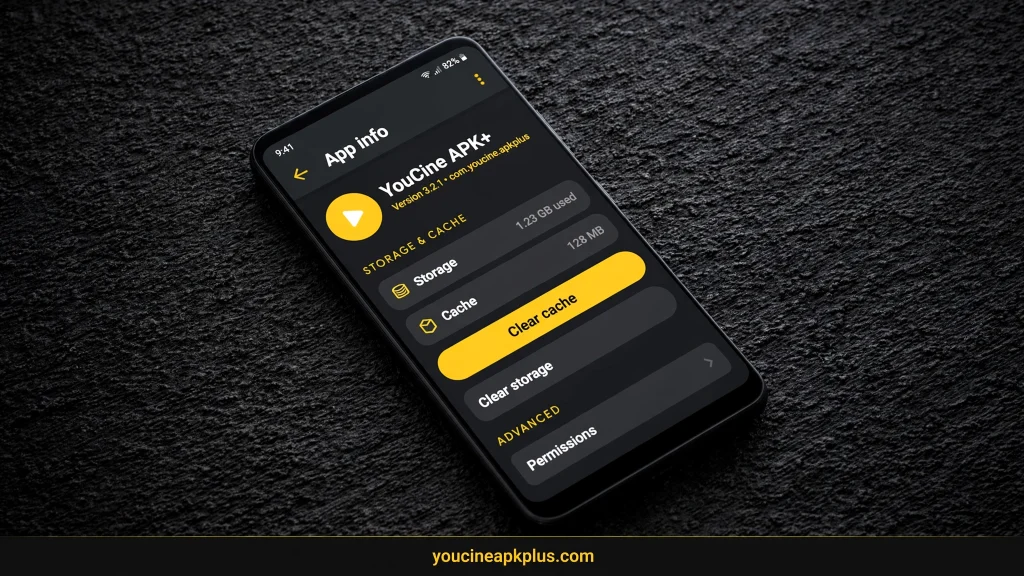
Fix 5: Clear the App Cache
Open Settings, Apps, YouCine, Storage, then tap Clear cache. This removes temporary files and often cures crashes and loading loops without touching your account or settings.
Fix 6: Clear App Data
If clearing the cache does not help, tap Clear data in the same menu. This resets the app, so you will be signed out and local history and offline downloads may disappear.
Fix 7: Update to the Latest Version
An outdated build can stop working when sources or servers change. Install the newest APK from a file you trust and have scanned, then reopen the app.
Fix 8: Reinstall the App Cleanly
Uninstall YouCine, delete the old APK file, restart your device and install a fresh, scanned copy. A clean reinstall removes damaged files that clearing the cache cannot reach.
Fix 9: Free Up Storage
When a phone or TV box is nearly full, apps crash or refuse to load. Delete unused apps, old downloads and installer files so you have at least a few hundred MB free.
Fix 10: Remove Battery and Data Restrictions
Battery saver and data saver can cut off background activity. Open the app’s battery settings and set it to unrestricted, then check that data saver is not blocking YouCine.
Fix 11: Pause VPN, Private DNS and Ad Blockers
A VPN, a private DNS service or an ad-blocking tool can interfere with streams. Switch them off one at a time to see whether the app starts working again.
Fix 12: Try a Different Source or Title
Streams come from online sources that fail independently. Pick another source for the same movie, or test a different title, before assuming the whole app is broken.
Fix 13: Lower the Video Quality
A heavy HD or Full HD stream can choke a weak connection or an older device. Dropping one quality level often removes buffering and black screens at once.
Fix 14: Update Your Device Software
Old system software can clash with newer apps. Check for Android or TV firmware updates under Settings, then restart and test YouCine again.
Fix 15: Try Another Device or an Older Build
If nothing helps, test the app on a different phone, a TV box or an emulator. You can also roll back using our old version guide, but only with files you have checked.
Fixes by Symptom: What to Do for Each Problem
Extra tips for the most common individual problems.
YouCine Not Opening or Crashing on Launch
Start with Fixes 5, 6 and 8. If it began right after an update, the new build may not suit your device. Check your Android version and consider the previous release.
YouCine Videos Not Loading
Try Fixes 12 and 2 first. If every title fails everywhere, the sources are likely down, so waiting a few hours is the honest answer. Repeated reinstalling will not bring them back.
YouCine Black Screen
A black screen with working sound usually means a player glitch. Lower the quality, switch the source, and restart the app. On a PC emulator, update your graphics drivers too.
YouCine Buffering
Lower the quality, move to 5 GHz Wi-Fi or a cable, and pause other downloads on your network. Old TV boxes struggle with HD, so Standard quality helps them a lot.
YouCine Login or QR Code Not Working
QR codes expire quickly, so refresh the code and make sure both devices are online. Our YouCine login and QR guide walks through the steps. If login still fails, update the app and generate a fresh QR code.
YouCine Subtitles Not Showing or Out of Sync
Switch the subtitle track or choose another source. If it persists, open the video in an external player. Our languages and subtitles guide explains what to expect.
YouCine Not Working After an Update
Clear the cache and data, then reinstall. If it still fails, an older build may run better on your device. Remember that older files can lack fixes, so scan them first.
YouCine Not Working on Android TV, Fire Stick and PC
Platform-specific notes, with full guides on their own pages.
On Android TV and Fire Stick
Open the app settings on your TV and clear the cache. On Fire TV the path is Settings, Applications, Manage Installed Applications, YouCine. Small sticks run out of storage fast, so free some space. Full steps are in our Smart TV guide.
On a PC Emulator
Give the emulator more RAM, update your graphics drivers and make sure virtualization is on. If the emulator itself crashes, reinstall it from the official site. See our YouCine for PC guide.
On an iPhone
There is no verified iOS version, so if a page told you to install something on your iPhone, the problem may be the file itself. Read our YouCine for iOS guide before trying anything else.
Common YouCine Error Messages and What They Mean
A plain-language guide to the messages that show up most often.
| Message or behavior | What it usually means | What to try |
|---|---|---|
| App not installed | Storage, signature or architecture problem | Free space, uninstall the old version, download again |
| Parse error | Android version too old or damaged file | Check requirements and re-download |
| Source not available | That stream is down | Pick another source or title |
| Network error | Connection or blocked network | Switch networks, restart the router |
| Playback error | Player or format problem | Lower quality or use an external player |
| Endless loading circle | Slow source or weak connection | Fixes 2, 12 and 13 |
Wording differs between builds, so use this table as a rough guide. The cause matters more than the exact text on the screen.
A Quick Note About Install Errors
If the problem appears while installing rather than while watching, the fix is different. Check the file size, free storage and whether an older version is still installed. Our old version guide explains why Android blocks some installs.
When the Problem Is Not Yours to Fix
Some YouCine not working outages are simply outside your control.
YouCine pulls its content from third-party sources, and those sources can disappear, get overloaded or change without warning. When that happens, titles stop loading for everyone, and no amount of clearing the cache will help.
- If every title fails on every device and network, wait a few hours and try again.
- If a network blocks the app, such as a school or workplace network, use a network where it is allowed.
- If the app stays dead for days, move to a legal alternative until it returns.
Warning: Do Not Download “Fixed” or “Working” Versions
A tempting shortcut that often makes things worse.
When an app stops working, pages suddenly appear offering a “new working version” or a “fixed APK”. Many of these are modified files, and some carry malware. Treat anything that promises a miracle fix with suspicion.
- Scan any file on VirusTotal before you open it.
- Avoid files labeled pro, premium or unlocked.
- Never give a download page your email, phone number or card details.
Our YouCine safety guide explains how to check a file properly.
How to Stop YouCine From Breaking Again
A few habits that cut down on future problems.
- Keep at least a few hundred MB of free storage on the device.
- Install updates from trusted, scanned files rather than random pages.
- Clear the cache every few weeks if the app starts to slow down.
- Keep Android or your TV firmware up to date.
- Keep a second streaming option installed for the days when the sources go down.
Free Legal Alternatives When YouCine Is Down
Apps that keep working when unofficial sources go offline.
- Pluto TV offers free live channels and on-demand titles with ads.
- Tubi has a large free library of movies and series.
- YouTube includes free movies and many official channels.
- Plex provides a free ad-supported catalog, plus your own media.
Their catalogs are smaller, but they update through official stores and do not vanish overnight.
YouCine Not Working FAQs
Quick answers to the questions people ask most.
Why is YouCine not working today?
For YouCine not working today, the usual causes are a source outage, a weak connection, an outdated build or a full device. Run the quick test in this guide to find out which one applies.
Why is YouCine not loading videos?
Either the source behind the title is down or your connection is struggling. Try another source, another title and another network.
Is YouCine down for everyone?
If every title fails on every device and network, the sources are probably down for everyone. If it works elsewhere, the problem is on your side.
Why does YouCine keep crashing?
A damaged cache, low storage or a build that does not suit your device are the common causes. Clear the cache, free some space and reinstall.
Will reinstalling YouCine fix it?
Often, yes, for local problems. It will not help if the sources are down, so test another title first.
Do I lose my data if I clear the app data?
You will be signed out, and local history and offline downloads can disappear. Clear the cache first, because it does not touch your data.
Why does YouCine not work on my TV?
Small TV devices run out of storage and memory. Free space, clear the cache and lower the video quality. Our Smart TV guide has the full steps.
Should I install an older version?
Only if the latest build clearly does not suit your device, and only with a file you have scanned. Older files can lack fixes.
Final Verdict: Getting YouCine Working Again
My bottom line on the fastest route back to a working app.
Most of the time, YouCine not working problems are fixed by clearing the cache, checking your connection, updating or reinstalling a clean copy, and trying another source. Work through the list in order, and you will usually find the culprit quickly. If nothing works, the cause is likely on the source side, so wait it out or switch to a legal service for now. And whatever you do, do not grab a mystery “fixed” APK, because that is how a small problem turns into a big one. Want to keep going? Visit the main YouCine APK page for download details.
Disclaimer: This article is for information only. We do not host or promote copyrighted content. You are responsible for following the copyright laws of your country.


